
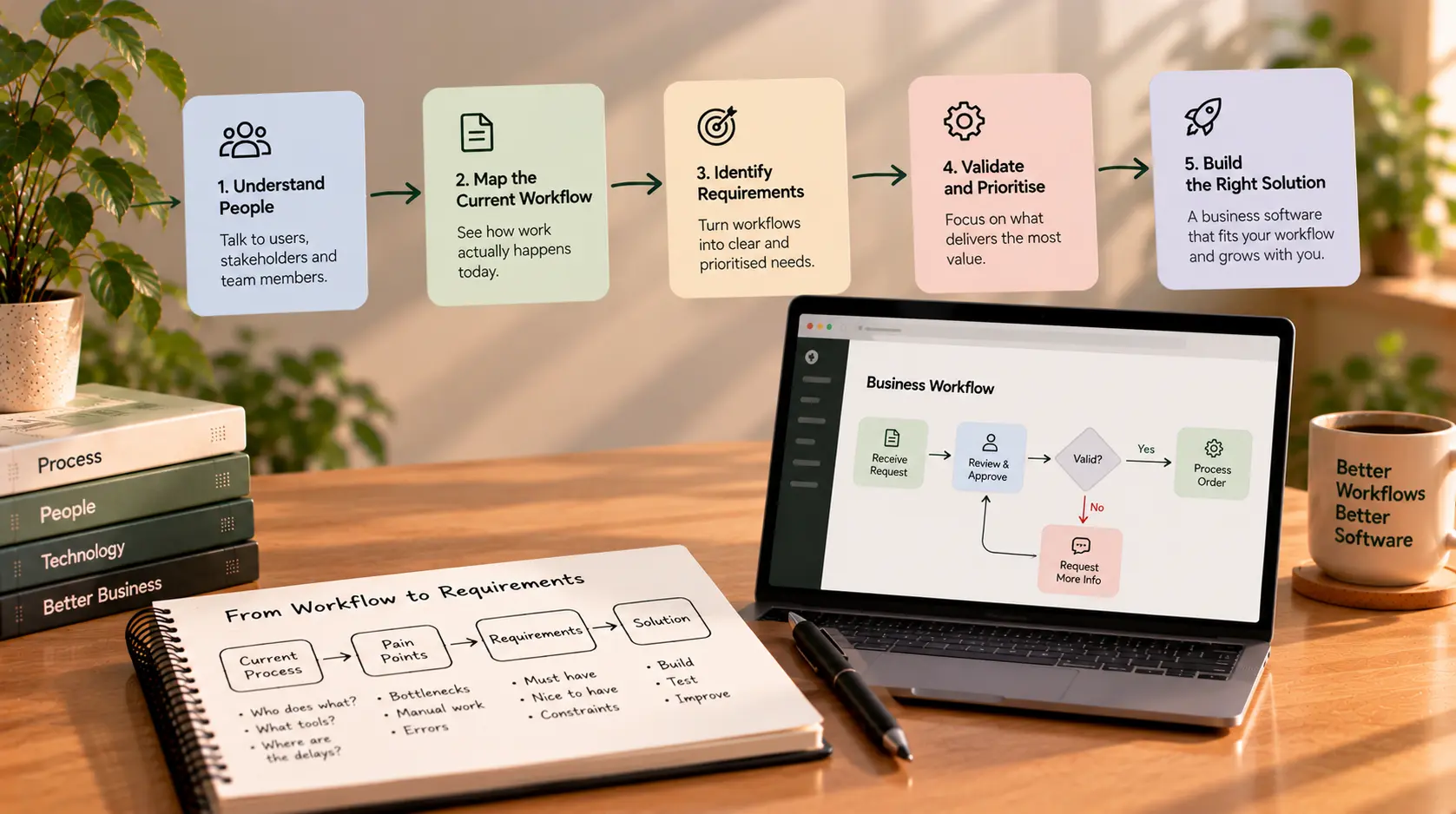
Requirements Gathering for Business Software: Start With the Workflow
When a business decides to build software, the first conversation often jumps straight to features: a dashboard, customer portal, automated emails, reports, integrations, or a mobile app.
Those ideas may be useful, but they do not explain the full problem the software needs to solve. Who will use each feature? What triggers an action? Which information is required? Who approves the result? What happens when something is missing or goes wrong?
Without those answers, a feature list can leave developers guessing about the real workflow. The result may look like the original request but still fail to support the way the business operates.
That is why effective requirements gathering for software should start with the workflow—not the screen design or the technology stack. First understand how work happens today, where it breaks down, and what outcome needs to improve. Then turn that understanding into clear, testable requirements.
This guide explains a practical workflow-first approach that founders and managers can use before investing in business software.
What Is Requirements Gathering?
Requirements gathering is the process of identifying, clarifying, documenting, and validating what a software project needs to achieve. It connects business goals and user needs to the behavior the software must support.
Requirements may describe:
- Business outcomes: What should improve, such as reducing manual work or responding to customers faster.
- Users and roles: Who uses the system, who approves actions, and who needs access to information.
- Workflows: The steps people follow to complete a task.
- Functional requirements: What the software must do.
- Non-functional requirements: How the system should operate, including performance, reliability, accessibility, and security expectations.
- Business rules: Policies, calculations, eligibility conditions, and exceptions the software must follow.
- Data and integrations: What information the system needs and which existing tools it must work with.
- Constraints: Limits involving budget, timing, technology, regulations, or available resources.
The goal is not to document every possible detail before anyone can start working. It is to create a shared, validated understanding of the problem, the first release's scope, and the questions that still need answers. Atlassian's requirements gathering guide similarly describes gathering goals, scope, constraints, deliverables, and success criteria before execution.
Why Start With the Workflow?
A feature describes a capability; a workflow describes how people use capabilities to get work done.
For example, “build an approval dashboard” is a feature request. It does not explain who submits a request, which information must be included, who reviews it, what happens when it is rejected, or how the requester learns about the decision.
A workflow makes those missing details visible.
Starting with the workflow helps you:
- Discover steps that are easy to overlook when discussing features individually.
- Identify handoffs between employees, teams, customers, and external systems.
- Find duplicated data entry and unnecessary manual work.
- Expose exceptions, approval rules, and dependencies early.
- Decide which features are genuinely necessary for the first release.
- Give developers a more reliable basis for estimating effort.
- Create acceptance criteria that can later be tested.
Microsoft's guidance on defining solution requirements recommends mapping business processes because requirements based only on isolated features can miss process steps and create misunderstandings. See Define your requirements for your Dynamics 365 solution.
Step 1: Define the Business Problem Before the Solution
Begin by describing the problem in business terms. Avoid starting with the assumption that a particular application or feature is the answer.
A useful problem statement explains:
- Who experiences the problem
- What is difficult, slow, expensive, or unreliable
- When and how often it occurs
- What impact it has on customers or the business
- What a better outcome would look like
Feature-led statement:
“We need a dashboard to manage customer enquiries.”
Problem-led statement:
“Enquiries arrive through email and website forms, and staff track them in separate spreadsheets. Some enquiries do not receive a timely response, and managers cannot easily see which ones are still waiting.”
The second statement gives the team something to investigate. A dashboard may still be the right solution, but the actual need could include a shared queue, ownership rules, status tracking, reminders, and reporting.
Ask stakeholders what happens today before deciding what the software should look like.
Step 2: Identify Everyone Involved in the Workflow
The person paying for software may not be the person using it every day. A founder may set the business goal, while an operations manager, customer support employee, finance team, or customer experiences the workflow directly.
Identify the people who:
- Perform the work
- Receive the output
- Approve or reject decisions
- Maintain the underlying data
- Support the process when something goes wrong
- Need reports or oversight
- Must review security, privacy, legal, or operational requirements
For each stakeholder, clarify their responsibilities and decision-making authority. A person may provide valuable input without having final approval over scope.
Try to observe the people who perform the work, not just ask managers how they believe it happens. The actual process may include workarounds, informal approvals, repeated checks, and exceptions that are not documented anywhere.
Step 3: Map the Current Workflow From Start to Finish
Document the process as it works today, sometimes called the current-state or as-is workflow.
Choose one representative task and follow it from the initial trigger to the final outcome. For example, an enquiry-handling workflow might look like this:
<box border radius="xl" padding={3} gap={2}> <title size="md">Example: Current enquiry workflow</title> <box background="surface-secondary" radius="md" padding={3} align="center"> **1. Enquiry arrives**<text color="secondary" size="sm">Email or website form</text>
<text color="secondary" size="sm">Details may be copied manually</text>
<text color="secondary" size="sm">Ownership may not be visible to everyone</text>
<text color="secondary" size="sm">Follow-up can be missed if tracking is inconsistent</text>
The point of this map is not to criticise the existing process. It is to make the steps and friction visible so the team can decide what should change.
For each step, record:
- Who performs it
- What information they need
- What tool or document they use
- What decision they make
- What output or status change occurs
- Where delays, errors, or repeated work happen
- What happens if the expected information is unavailable
Include the normal path and the important exceptions. A process that works only when every field is complete and every person responds on time is not fully understood.
Step 4: Design the Desired Workflow
Once the current process is clear, describe how it should work after the problem is addressed. This is the future-state or to-be workflow.
For the enquiry example, the future workflow might be:
- New enquiries enter a shared queue.
- Required contact details are validated.
- An enquiry is assigned to a team member.
- The assigned person can see their outstanding follow-ups.
- The team records the response and changes the status.
- Managers can identify overdue enquiries and review performance.
Now you can discuss which steps should be automated, which require human judgement, and which need a manual fallback.
Do not assume that every manual step should be automated. Some steps exist for a reason, such as reviewing an unusual request or approving a high-value transaction. The goal is to remove unnecessary friction while preserving the controls the business needs.
Step 5: Capture Business Rules and Exceptions
The ordinary path rarely tells the whole story. Business rules define what should happen in specific situations, and exceptions explain what happens when the usual conditions are not met.
For example, an appointment-booking system may need to answer:
- Can two customers book the same time slot?
- How close to the appointment can a booking be cancelled?
- Who can reschedule an appointment?
- What happens if a payment fails?
- Can a staff member override availability?
- What happens when a required customer detail is missing?
For an approval process, rules may define approval limits, escalation paths, rejection reasons, and who can approve a request.
Document these rules in plain language. If stakeholders disagree, record the conflict as an open decision instead of letting the developer silently choose one interpretation.
Step 6: Turn Workflow Steps Into Software Requirements
Once the workflow is understood, translate each step into requirements that the developer and tester can interpret consistently.
A helpful requirement should be clear, specific, relevant, and verifiable.
| Workflow need | Example software requirement | How to verify it |
|---|---|---|
| Staff need to identify new enquiries | The system must display new enquiries in a shared queue | Submit a test enquiry and confirm it appears |
| Each enquiry needs an owner | Authorised staff must be able to assign an enquiry to a team member | Assign an enquiry and verify the owner is saved |
| Managers need to spot overdue work | The system must identify open enquiries past the agreed response deadline | Create an overdue test record and confirm it is flagged |
| Staff need to track progress | Users with the correct permissions must be able to update an enquiry's status | Change the status and confirm the update is reflected |
| Restricted information must remain protected | Users must only access records permitted by their role | Test access using different authorised roles |
These examples are illustrative. Real requirements should use the business's actual terminology, deadlines, roles, and rules.
Avoid requirements such as “the system should be user-friendly” or “the dashboard should be fast” without further detail. Explain what usability or performance means for the relevant task and how the team will evaluate it.
Step 7: Define Data, Integrations, and Non-Functional Needs
A workflow also depends on the information moving through it and the conditions under which the system must operate.
Data requirements
Identify the records the software needs, the source of each field, who can update it, and how long it should be retained. Clarify which information is required, which values are allowed, and how duplicates or inconsistent records should be handled.
Integration requirements
List the existing systems that must exchange information, such as a CRM, accounting platform, calendar, payment provider, or email service. For each integration, describe what data moves, when it moves, and what should happen if the connection fails.
Non-functional requirements
Consider requirements that affect how the application operates:
- Security and privacy: Who may access information, and how should sensitive data be protected?
- Performance: Which tasks need to complete within a reasonable time under expected usage?
- Reliability: What happens when a service is unavailable or an operation fails?
- Accessibility: Can intended users navigate and understand the interface?
- Auditability: Which important actions and changes need to be recorded?
- Scalability: What growth assumptions should influence the design?
- Recovery: What backup and restoration expectations apply?
Not every project needs a large formal specification. The level of detail should reflect the product's complexity, risks, and cost of changing it later.
Step 8: Prioritise Requirements Before Estimating the Build
Once requirements are documented, separate what is essential for the first release from what can wait.
A simple method is MoSCoW prioritisation:
- Must have: Required for the core workflow, a critical business rule, or safe operation.
- Should have: Important, but a reasonable first release can work without it.
- Could have: Useful if time and budget allow.
- Won't have this time: Explicitly deferred from the current scope.
For example, an enquiry-management MVP may need to capture enquiries, assign ownership, track status, and protect access to records. Advanced analytics, multiple automation rules, and several optional integrations may be deferred—unless they are essential to the product's purpose.
Prioritisation should be agreed with stakeholders. It should not be based solely on which feature sounds exciting or easiest to build.
Step 9: Validate the Requirements With Real Scenarios
Before development begins, walk through the requirements with the people who will use and approve the system. Do not review only the document line by line; act out realistic tasks.
Ask questions such as:
- Can a new user complete the main task from beginning to end?
- What happens when required information is missing?
- What happens when a request is rejected or cancelled?
- Who can change a record after it has been approved?
- What does the user see when an integration fails?
- How will staff know that an action succeeded?
- What information does a manager need to resolve an exception?
Prototypes, simple diagrams, and sample records can make requirements easier to discuss before the team invests in the full implementation.
Record the agreed decisions, remaining questions, and approval owner. Requirements may evolve during development, but changes should be visible so the team can assess their effect on cost, timeline, and scope.
Step 10: Turn the Requirements Into a Development Plan
Requirements should lead to a plan that the team can estimate, build, and test. Break the approved workflow into deliverables, assign owners, identify dependencies, and agree on acceptance criteria.
A useful planning package often includes:
- Business problem and desired outcome
- Stakeholder list and decision owners
- Current-state and future-state workflow
- User roles and permissions
- Functional and non-functional requirements
- Business rules and exception handling
- Data and integration needs
- Prioritised first-release scope
- Acceptance criteria
- Assumptions, risks, dependencies, and open questions
- Out-of-scope items
- Milestones and approval points
The document does not need to be lengthy to be useful. A small internal tool may need a concise workflow diagram and prioritised requirement list. A complex system with sensitive data, multiple teams, or external integrations may need more formal documentation.
The important thing is that the developer can understand what must be delivered, why it matters, and how the team will confirm it works.
Common Requirements-Gathering Mistakes
Starting with screens instead of work
Mockups can help people communicate, but they do not replace understanding the process, rules, and exceptions behind the interface.
Listening only to the project sponsor
Leadership may understand the business goal but miss the workarounds and edge cases that frontline staff encounter every day.
Treating every request as a must-have
A list of all possible features is not an agreed first-release scope. Prioritise requirements against outcomes, risk, and available resources.
Ignoring exceptions
Cancellations, rejected approvals, missing information, duplicate records, and service failures often reveal requirements that the normal workflow hides.
Leaving assumptions undocumented
If a decision has not been confirmed, label it as an assumption or open question. Do not let estimates quietly depend on it being true.
Writing requirements that cannot be tested
“Make it simple” does not define a verifiable result. Describe the task, expected behavior, and the conditions that show the requirement has been met.
Treating requirements as frozen forever
New information may emerge during development. Record changes, assess their impact, and agree on priorities rather than allowing scope to expand informally.
A Practical Requirements-Gathering Checklist
Use this checklist before asking a developer to estimate or begin a business software project.
- The business problem and desired outcome are written clearly.
- The main users, process owners, and approvers are identified.
- The current workflow has been mapped from start to finish.
- The desired workflow and key improvements are documented.
- Important business rules and exceptions are captured.
- Required data, reports, and integrations are identified.
- Security, privacy, performance, and operational needs are considered.
- Requirements are prioritised for the first release.
- Each important requirement has a way to verify it.
- Assumptions, risks, dependencies, and open questions are visible.
- Out-of-scope features are recorded.
- Stakeholders have reviewed and approved the initial scope.
Final Thoughts
Good requirements gathering is not about producing the longest document or collecting the largest feature list. It is about understanding how the business works, identifying where the current process falls short, and agreeing on what the software needs to change.
Start with the workflow. Talk to the people who perform it, map the usual path and the exceptions, document the business rules, and turn the findings into clear, prioritised, testable requirements. This gives developers a stronger basis for estimating and building the right solution—and gives business stakeholders a clearer way to judge whether the result meets their needs.
If you're planning business software and want to clarify the workflow before development begins, learn more about Sajid Kalam or discuss your project requirements directly through the contact page.