
How Long Does It Take to Build a Web Application?
If you are planning a web application, one of the first questions you will ask is: How long will it take to build?
You may be planning a startup MVP, a customer portal, a booking platform, an internal business tool, or a larger SaaS product. Each has a different set of requirements, so there is no single timeline that applies to every project.
As a broad planning guide, a small web application with one main workflow may take several weeks, while a more involved product can take several months or longer. The useful estimate comes from understanding what needs to be built, what can be reused, which systems must connect, and how much testing and review the product requires.
Treat timeline ranges as planning estimates, not promises. The goal is to understand what drives the schedule and get a realistic plan for your specific application.
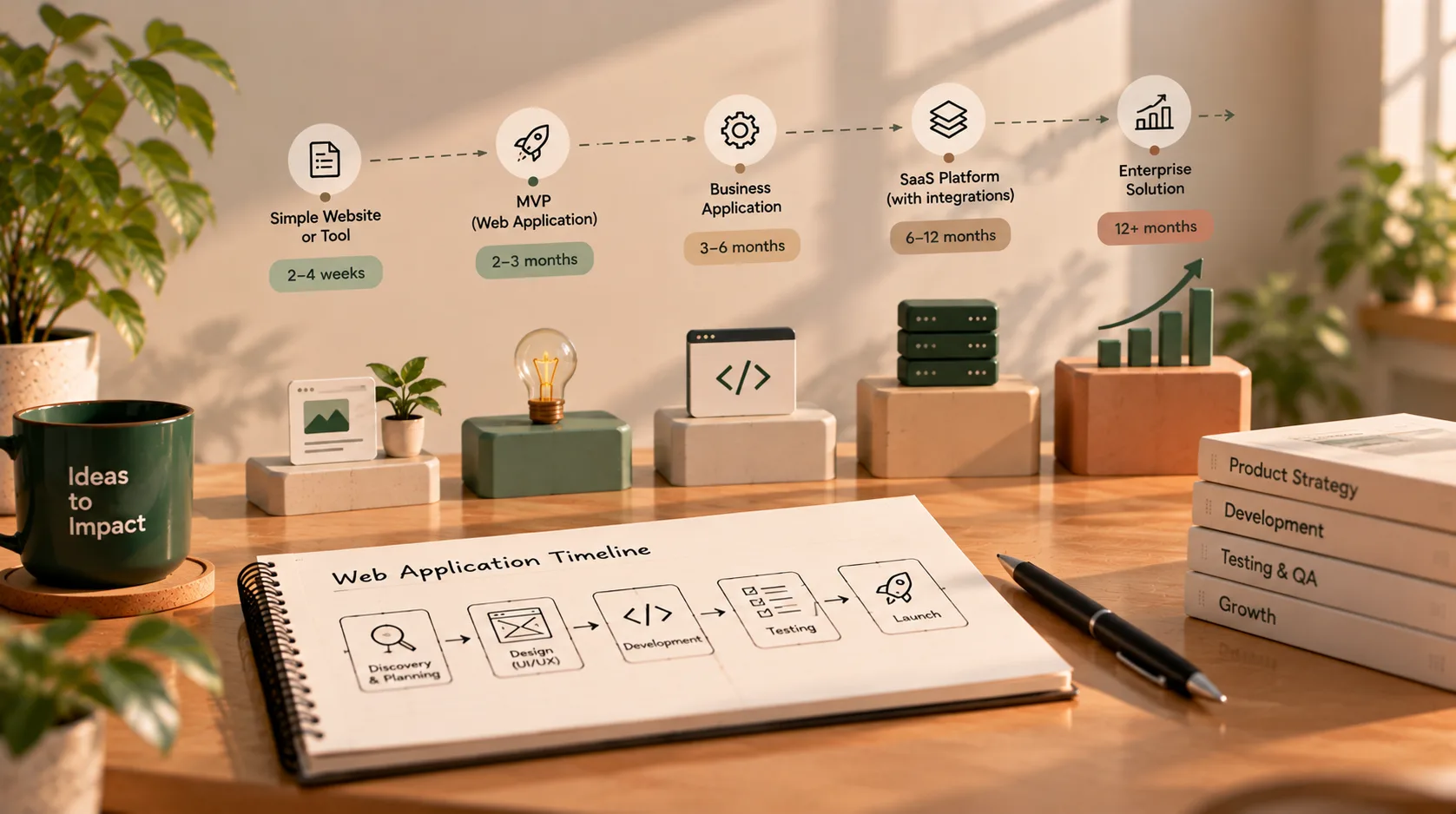
How long can different types of web applications take?
The ranges below are illustrative starting points for planning. They assume that a project has an agreed scope, access to the necessary people and systems, and reasonably timely feedback. A project can fall outside these ranges if its requirements or constraints differ.
| Type of project | Illustrative planning range | What can affect the timeline |
|---|---|---|
| Simple internal tool or dashboard | 4–8 weeks | Number of workflows, data sources, permissions, and reporting needs |
| Focused web app MVP | 6–12 weeks | Scope discipline, authentication, core workflow, testing, and launch requirements |
| Standard business web application | 3–6 months | Custom interface, several user roles, business rules, integrations, and QA |
| SaaS product or marketplace | 3–9+ months | Subscription logic, multiple user journeys, payments, notifications, and operational complexity |
| Enterprise or regulated application | 6–12+ months | Security reviews, audit requirements, legacy systems, data migration, approvals, and compliance obligations |
These categories overlap because labels such as “MVP,” “SaaS,” and “business application” can describe very different products. A narrow SaaS MVP with one core workflow may be simpler than an internal application with complicated permissions and legacy integrations.
Use the table to frame a conversation—not to set a deadline before the requirements are known.
What does the web app development timeline include?
A common planning mistake is to count only the time developers spend writing code. A web application also needs decisions, design, testing, deployment, and a way to handle problems after launch.
1. Discovery and scope
The first stage is to clarify the problem the application should solve, who will use it, and which workflows are essential for the first release.
This stage may include:
- Defining the target users and their needs
- Mapping the main user journey
- Listing required features and user roles
- Identifying data, integrations, and constraints
- Agreeing on what is outside the first release
- Defining acceptance criteria for important features
A small, well-understood project may need only a short planning period. A product with multiple stakeholders or uncertain requirements may need more discovery. Spending time clarifying the scope can prevent larger delays caused by rework later.
2. UX and interface design
Design includes more than choosing colours. The team may need to map screens, decide how users move between tasks, account for empty and error states, and make the interface work across relevant screen sizes.
The amount of design work depends on the product. A simple internal tool using a familiar layout may need less custom design than a customer-facing platform with several complex workflows.
If the client is still deciding what the product should do, design can also reveal missing requirements. That is useful work, but it can affect the schedule if major decisions are postponed until development is underway.
3. Backend and frontend development
This is the main implementation stage. Depending on the project, it can include database design, authentication, permissions, business logic, APIs, forms, dashboards, notifications, search, and integrations.
The timeline depends on how many distinct workflows need to work end to end—not just how many screens appear in a design.
For example, a form that saves a record may be straightforward. A workflow that checks permissions, validates several conditions, triggers notifications, updates related records, and records an audit history is more involved.
4. Integrations and data work
Connections to payment providers, CRMs, calendars, email services, analytics tools, or legacy systems can add significant work. Each integration has its own configuration, credentials, error cases, rate limits, and testing needs.
Existing data can also create delays. Before importing data from spreadsheets or an older application, the team may need to inspect its quality, resolve duplicates, map fields, and decide how to handle incomplete records.
Do not assume that an integration is trivial just because the external service has an API. Ask which exact workflows are included and whether the required access and documentation are available.
5. Testing and revisions
Testing helps confirm that the important workflows behave as expected. It may include functional testing, permission checks, integration testing, browser and device checks, automated tests, and user acceptance testing.
The level of testing should fit the risk of the application. A simple prototype does not require the same release process as a product that handles payments or sensitive customer information. However, skipping essential checks can create delays after launch, when fixes affect real users.
Leave time for feedback and bug fixes. A first version that works only on the developer’s machine is not a finished production application.
6. Deployment and launch
Launching may involve production hosting, domain and HTTPS configuration, environment variables, database setup, static and media files, logging, monitoring, backups, and access controls.
For Django applications, the official deployment checklist is a useful reminder that production readiness involves security and operational configuration as well as code.
The launch stage may be relatively short for a simple application with an established deployment process. It can take longer when infrastructure, access permissions, external approvals, or production data need to be prepared.
7. Post-launch stabilisation
The first release is not necessarily the end of the project. Real users may reveal usability issues, unexpected edge cases, or workflow improvements that were difficult to identify during development.
Plan how early feedback will be handled. This might mean a defined bug-fix period, a short stabilisation phase, or a separate ongoing maintenance agreement. Clarify what counts as fixing a defect versus adding a new feature.
What makes a web application take longer?
Several factors can move a project toward the shorter or longer end of a planning range.
Scope and feature complexity
Every feature has its own design, implementation, validation, and testing requirements. Multiple user roles, detailed permissions, complex approval rules, reporting, and edge cases can add more work than the visible interface suggests.
The best way to keep a first release focused is to identify the single most important workflow and build that journey end to end before adding secondary features.
Unclear requirements and scope changes
If decisions are still changing while development is underway, developers may have to revise data models, interfaces, tests, or earlier implementation work. That adds time and can introduce new bugs.
Some changes are unavoidable. The important thing is to make them visible. Agree on a process for assessing the effect of a new request on cost, scope, and delivery before approving it.
Integrations and third-party dependencies
A project may depend on access to external APIs, vendor accounts, payment-provider approval, email configuration, or another company’s technical support. These dependencies can affect the schedule even when the developer has completed the related code.
List dependencies early and identify who is responsible for securing access and making decisions.
Data migration and data quality
Moving data from spreadsheets or an existing system is not always a simple copy operation. Data may be incomplete, inconsistent, duplicated, or structured differently from the new application’s database.
A migration plan should account for mapping, validation, test imports, backups, and a safe approach to the final transfer when relevant.
Security, privacy, and compliance requirements
Applications that handle sensitive information, financial workflows, or regulated data may require additional access controls, audit trails, reviews, documentation, and approval processes.
These requirements should be identified early. They are part of the product scope, not optional work to squeeze into the final week.
Feedback and decision speed
Development depends on decisions about requirements, design, priorities, and acceptance. If the developer waits several days for feedback at every milestone, the calendar timeline can expand even if the amount of coding stays the same.
Choose a decision-maker, schedule regular reviews, and provide consolidated feedback. Fast decisions do not mean approving everything immediately; they mean resolving questions in a predictable way.
Team size and availability
Adding developers does not automatically reduce the timeline. Some work can happen in parallel, but architecture, shared code, onboarding, reviews, and coordination also take time. The effect depends on the project and the team’s experience.
Ask who will actually work on the project, how much time they can commit, and which tasks can happen in parallel. An estimate should reflect the real team and its availability.
A practical way to plan the schedule
Instead of asking for a single launch date first, ask the developer to break the project into milestones. A plan might look like this:
| Milestone | What should be clear before moving on |
|---|---|
| Scope agreed | Core workflows, priorities, exclusions, and acceptance criteria are documented |
| Design reviewed | Key user journeys and important interface states are approved |
| Core workflow built | The main user journey works in a reviewable environment |
| Integrations and secondary features | Agreed connections and supporting features are implemented and checked |
| Testing and fixes | Critical issues are resolved and agreed acceptance checks pass |
| Production launch | Hosting, configuration, access, backups, and launch steps are ready |
| Handover | Code, documentation, account access, known limitations, and support terms are clear |
The sequence will vary. Some design and testing can happen in parallel with development, and simpler projects may combine several milestones. The important part is that each milestone has a tangible result and a review point.
Ask for the assumptions behind the estimate too. For example: Are designs supplied? Is content ready? Are third-party accounts accessible? Who approves the work? Are mobile layouts included? Does the timeline include deployment and handover?
How can you shorten the timeline without creating avoidable risk?
You can often make delivery more predictable by reducing uncertainty and limiting unnecessary work.
- Start with one core workflow. Build the smallest useful version that can be tested with real users.
- Separate must-haves from later ideas. Keep secondary features in a backlog rather than adding them automatically.
- Prepare a project brief. Explain the problem, users, workflows, constraints, and success criteria.
- Make decisions promptly. Agree on who can approve scope and design decisions.
- Use proven components where appropriate. Reuse reliable frameworks and services instead of rebuilding standard capabilities without a reason.
- Secure integration access early. Do not wait until the development stage to request credentials or vendor approval.
- Review working software regularly. Early feedback can identify misunderstandings before they spread through the project.
- Do not remove essential testing. Cutting scope is usually safer than cutting checks needed to protect critical workflows.
AI coding tools and reusable components may speed up some tasks, such as scaffolding, boilerplate, documentation, or generating initial test ideas. They do not remove the need to understand the requirements, review code, test behaviour, handle security, and prepare a reliable release. Any time saved depends on the project and how those tools are used.
Why a very short estimate can be misleading
A short timeline is not automatically a red flag. A developer who has built similar applications may be able to reuse established patterns, and a focused MVP can be much smaller than a full product.
The concern is a confident deadline that arrives before the developer has understood the requirements. If an estimate does not mention testing, integrations, deployment, review cycles, or assumptions, it may describe only part of the work.
Ask the developer to explain:
- What is included in the estimate?
- What is explicitly excluded?
- Which assumptions could change the schedule?
- What milestones will demonstrate progress?
- How will new requirements be handled?
- Does the timeline include testing, launch, and handover?
A useful estimate should help you understand the work and the risks—not simply give you a date that sounds attractive.
What should you provide to get a realistic estimate?
You do not need a complete technical specification before talking to a developer. A concise brief can make the first conversation much more productive.
Include:
- The problem: What is the application meant to improve?
- The users: Who will use it, and what roles do they have?
- The core workflow: What should a user be able to accomplish from start to finish?
- Must-have features: Which features are essential for the first release?
- Integrations and data: Which systems must connect, and is existing data being migrated?
- Constraints: Budget, launch target, security needs, or existing technology.
- Decision process: Who will review the work and approve changes?
- Success criteria: How will you know the first version is useful?
This gives the developer a basis for discussing options, identifying unknowns, and preparing a more defensible estimate.
So, how long should you expect?
A focused web application may be possible in several weeks. A more involved product may take months. The schedule depends on the work that must be completed, the complexity of the workflows, external dependencies, testing requirements, and how quickly decisions can be made.
There is no benefit in forcing every project into the same timeline. A simple tool should not be burdened with unnecessary complexity, and a complex product should not be rushed past essential engineering and release work.
Start with the outcome you need, define the smallest useful scope, and ask for a milestone-based estimate with assumptions and risks clearly stated. That will give you a much more useful answer than a promise based on the project title alone.
If you are planning a web application and want to discuss its scope and likely delivery stages, get in touch. A clear conversation about requirements is the best starting point for a realistic plan.