
How Much Does It Cost to Host a Django App on AWS?
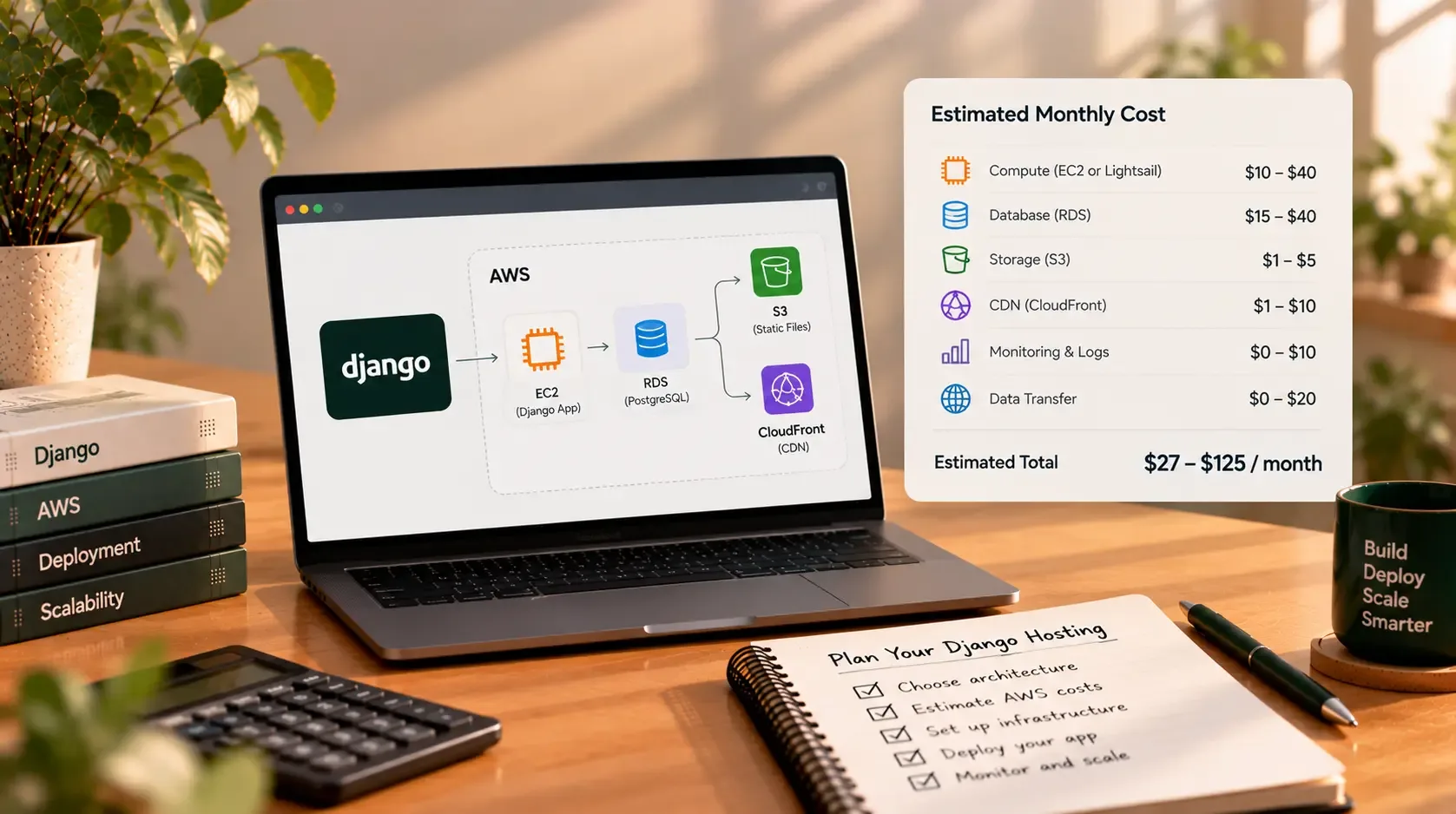
If you're planning to launch a Django application, AWS can provide the flexibility to start small and add capacity as your product grows. But the monthly bill is not simply the price of a server. Depending on how you deploy the application, you may also pay for a database, storage, backups, public IP addresses, data transfer, logs, monitoring, and services that improve availability.
The practical answer: a simple Django application can start on a low-cost bundled service such as Amazon Lightsail, while a more flexible EC2-based deployment can cost more once you add managed databases, load balancing, backups, and operational safeguards. The right budget depends on what your application actually needs.
This guide uses AWS's published pricing pages checked on 29 October 2026. Prices can vary by region, operating system, usage, taxes, account eligibility, and future pricing changes. Treat the figures below as planning guidance—not a quote or guarantee of your final bill.
Quick answer: what might Django hosting cost?
Use these broad planning categories to decide which architecture to investigate. They are not fixed AWS price bands; the final total must be calculated from the exact services, region, and expected usage.
| Application type | Typical architecture to evaluate | Main cost drivers |
|---|---|---|
| Portfolio, demo, or early MVP | One small Lightsail instance | Instance bundle, backups, domain, email and any extra storage |
| Small business application | Lightsail or one EC2 instance, with a separate or managed database if needed | Compute, database, storage, backups, bandwidth and monitoring |
| Customer portal or production SaaS | EC2 or container-based deployment, managed database, object storage, monitoring | Database availability, application capacity, data transfer, logs and backup retention |
| Business-critical application | Multi-AZ database and/or redundant app capacity, load balancing, stronger monitoring and recovery | Redundancy, load balancer, replicated resources, backup storage and operational requirements |
There is no responsible single price for “a Django app” without knowing its workload. A low-traffic content site and a customer portal processing frequent uploads, background tasks, and database queries can have very different costs.
Option 1: Amazon Lightsail for a straightforward deployment
Amazon Lightsail bundles compute, memory, SSD storage, and a data-transfer allowance into a predictable monthly plan. That makes it a useful starting point for a founder who wants to host a Django app without assembling every infrastructure component separately.
AWS's published Lightsail pricing page currently lists Linux/Unix virtual-server bundles with a public IPv4 address beginning at $5 USD per month, with other listed options at $7, $12, $24, and higher. The $5 plan shown on the pricing page includes 0.5 GB memory, 2 vCPUs, 20 GB SSD storage, and a 1 TB transfer allowance. Check the current regional price and plan details before choosing it. AWS also notes that some Asia-Pacific regions—including Mumbai—have half the transfer allowance shown for the standard bundles.
Official pricing: Amazon Lightsail pricing.
Is the cheapest Lightsail plan enough for Django?
It may be suitable for a small experiment or a very lightweight site, but don't choose a server based on the monthly price alone. Django, the web server, the operating system, background processes, and any local database all consume memory. A plan with only 0.5 GB RAM can become restrictive quickly, especially if the application runs several services on the same machine.
Before using the smallest plan for a real application, test:
- Memory usage under realistic requests.
- Response times when several users access the site.
- Database size and query performance.
- Upload and static-file requirements.
- Whether scheduled jobs or task workers run on the same server.
- How you'll back up and restore the application and database.
For many applications, the next bundle up—or a separate managed database—may be a better fit. Use measured performance rather than assuming a particular plan is suitable for every Django project.
What is not necessarily included in the base price?
A Lightsail instance does not automatically cover every possible application cost. Depending on your setup, extra charges may apply for snapshots, additional block storage, object storage, a CDN, a load balancer, managed databases, transfer beyond the allowance, domain registration, email delivery, and third-party services.
Lightsail is attractive when a bundled server meets your requirements. If you need more detailed control over networking, security boundaries, scaling, and managed infrastructure, compare it with an EC2-based architecture.
Option 2: Amazon EC2 for a more flexible deployment
Amazon EC2 lets you choose an instance type, operating system, storage configuration, and networking setup. On-Demand pricing charges for the compute capacity you consume, without requiring a long-term commitment. The price depends on the instance, region, operating system, and usage.
Official pricing: Amazon EC2 On-Demand pricing.
A simple EC2 deployment might include:
- An EC2 instance running Linux.
- Django served through a production application server such as Gunicorn or Uvicorn, depending on the application.
- Nginx or another suitable reverse-proxy configuration.
- A database running on the same machine or on a separate managed service.
- Static and uploaded media storage.
- A domain name and HTTPS configuration.
- Backups, logs, monitoring, and security controls.
The EC2 instance is only one line in the bill. If you run PostgreSQL on the same machine, you may reduce the number of billed services, but you also take responsibility for database maintenance, backup design, upgrades, and recovery. A managed database can reduce some operational work, but adds a separate cost.
Public IPv4 addresses can add to the bill
AWS lists public IPv4 address usage at $0.005 per address per hour on its VPC pricing page. For one address used continuously for an illustrative 730-hour month, that works out to about $3.65 per month, before any applicable free usage or other account-specific conditions.
Official pricing: Amazon VPC pricing.
This is a small example of why it is important to estimate every resource rather than only the EC2 instance. Review whether each resource needs a public IPv4 address, and check for unused addresses that are still being billed.
The main components in a Django hosting bill
1. Application compute
This is the server or service that runs Django and its application server. Cost depends on instance size, operating system, region, hours running, and whether you use one server or several.
A single instance may be enough for an early application, but it creates a single point of failure. Redundant application servers can improve resilience, although they add compute and often require a load balancer and additional networking.
2. Database
A Django application commonly uses PostgreSQL or MySQL. You can run the database on the application server or use Amazon RDS.
With a database on the same server, the bill may be simpler, but you must plan for backups, updates, storage, monitoring, and recovery. Amazon RDS provides managed database options, but its cost depends on the database engine, instance size, storage, deployment configuration, backup storage, and region.
Official pricing: Amazon RDS pricing.
For production systems, compare the cost with the time and risk involved in operating a database yourself. A managed database is not automatically required for every small app, but it may be worth paying for when reliability and reduced maintenance matter.
3. Persistent storage and media
Django's static assets and user-uploaded files have different needs. Static assets can be served from a web server or object storage/CDN arrangement; uploaded files often belong in durable object storage rather than on an instance's temporary filesystem.
Amazon S3 pricing depends on storage class, amount stored, requests, retrievals, and data transfer. Small usage may be inexpensive, but frequent downloads or requests and larger file collections can change the total.
Official pricing: Amazon S3 pricing.
4. Backups and snapshots
Backups protect against accidental deletion, application bugs, and infrastructure failure. Depending on the service and retention policy, snapshots and backup storage can add recurring charges.
Plan for more than “a backup exists.” Decide how often data is backed up, how long copies are retained, who can delete them, and how regularly you test restoring them.
5. Data transfer
AWS pricing can depend on how much data moves between services and out to the public internet. A site with many images, downloadable reports, or user uploads may transfer substantially more data than a text-heavy website.
Check the included transfer allowance for a bundled plan and the applicable rates for the exact services and region you use. Do not assume every transfer path is free.
6. Load balancing and high availability
A load balancer can distribute traffic across multiple application instances and support a more resilient architecture. It also adds a service to your bill. High availability may require resources in multiple Availability Zones, redundant compute, and a database configuration designed for failover.
Do not add these components simply because they sound more professional. Add them when the application's uptime, recovery, or capacity requirements justify the additional cost.
7. Logs, monitoring, and alerts
Logs help you investigate errors and understand application behaviour. Monitoring can alert you to high CPU usage, low disk space, elevated response times, or database pressure. Costs depend on ingestion volume, retention, metrics, alarms, and related services.
Keep enough logs to diagnose real problems, but avoid collecting excessive data or retaining everything indefinitely without a reason.
8. Domain, email, and external services
Your total launch budget may also include domain registration, transactional email, DNS, error monitoring, payment processing, and other third-party services. Some are billed by usage, some by subscription, and some by the number of messages or requests.
These are not all AWS charges, but they belong in the budget for operating the application.
Three example architectures to price
The following examples show what to enter into a cost estimate. They intentionally avoid presenting a made-up all-in monthly total: exact EC2 and RDS prices depend on region, instance choice, storage, and configuration.
Scenario A: early MVP
Architecture: One small Linux Lightsail instance, Django and the web server on the instance, limited storage, basic monitoring, and a tested backup plan.
Price the instance bundle first. Then add any snapshots, object storage, domain, email, and external services. If you keep the database on the same instance, account for the extra operational responsibility and make sure a backup can be restored independently.
Best when: You are validating a product, traffic is low, and the team can accept the limitations of a single server.
Scenario B: small business application
Architecture: One EC2 instance or a suitable Lightsail plan, a database arrangement chosen for the app's reliability needs, object storage if users upload files, and basic logs and alerts.
Estimate compute, storage, public IPv4 usage, database costs, backup storage, and transfer. Decide whether a managed database is worth the extra monthly expense. Check whether your database is publicly accessible; it generally should not be exposed directly to the public internet just to make application connectivity easy.
Best when: The application supports day-to-day business operations and you need a clearer separation between application and data management.
Scenario C: customer portal or production SaaS
Architecture: Multiple application instances or a container service, load balancing where required, a managed database configured for the desired availability, object storage, backups, and monitoring.
This setup has more moving parts and generally a higher baseline cost. Estimate the application service, load balancer, database compute and storage, backup retention, network transfer, logs, and any NAT or other networking services your architecture requires. High-availability choices can materially affect the monthly bill.
Best when: Downtime has meaningful business consequences, usage is growing, or recovery requirements call for more than one server.
How to calculate your own AWS estimate
Use the AWS Pricing Calculator before deploying. AWS documents the calculator as a way to generate monthly estimates for supported services and regions; you do not need an AWS account simply to begin estimating.
Follow this process:
- Choose a region. Select a region appropriate for your users, latency, data residency, and service availability.
- Describe the application. Estimate requests, active users, storage, upload volume, background jobs, and expected growth.
- Select the architecture. Decide between Lightsail, EC2, containers, and a managed database based on your needs.
- Add every service. Include compute, database, storage, backups, networking, public IP addresses, load balancing, logs, and transfer where applicable.
- Set realistic usage. Include how many hours resources run, how much data is stored, and how much data is transferred.
- Review free-tier eligibility and credits. Eligibility and terms can vary by account and date; don't build a long-term budget around a benefit until you've checked the current terms.
- Save the estimate and compare it with actual billing. Once deployed, review AWS billing tools regularly and investigate unexpected line items.
For a useful estimate, include a modest buffer for uncertain usage and re-evaluate the budget after you have real traffic data.
How to keep hosting costs under control
- Start with the simplest architecture that meets your requirements. Avoid adding a load balancer, multiple servers, or a complex container platform before you need them.
- Right-size compute. Measure CPU and memory use under realistic load instead of choosing a large instance “just in case.”
- Separate durable data from disposable compute. Keep backups and important uploads in appropriate durable storage.
- Set billing alerts. Use AWS billing and cost-monitoring features to spot unexpected increases early.
- Remove unused resources. Check for forgotten test instances, unattached storage, idle public IP addresses, old snapshots, and resources in other regions.
- Review logs and retention. Keep the data you need to operate and troubleshoot the app, and set reasonable retention periods.
- Check transfer costs. Optimise large media assets and use a CDN or object storage arrangement when it makes sense.
- Revisit the architecture as the product grows. A setup that is economical for an MVP may not be ideal once traffic, uptime requirements, or data volume changes.
Common mistakes when estimating AWS hosting
Pricing only the server
An EC2 price alone is not the cost of a production application. Database, storage, backups, networking, transfer, and monitoring can all affect the total.
Assuming the smallest instance will be enough
Django itself may be lightweight, but the operating system, web server, database, workers, and memory usage from real traffic all compete for resources. Test before committing to a plan.
Treating a development deployment as production-ready
A working application is not necessarily backed up, monitored, secured, or recoverable. Budget for the operational requirements your users and business need.
Forgetting regional differences
The same architecture can have different prices in different AWS regions. Some plans also have region-specific transfer allowances. Always price the actual region you intend to use.
Ignoring billing after launch
Usage can change. A test resource may be left running, logs can grow, or traffic can rise. Review costs after launch rather than assuming the first estimate will remain accurate.
Is AWS the right hosting choice for your Django app?
AWS can be a strong choice if you need flexible infrastructure, managed database options, detailed access controls, or a path from a small deployment to a more resilient architecture. Lightsail can simplify early hosting, while EC2 offers more control over the server environment.
But AWS is not automatically the cheapest or simplest option for every project. If your app is small and your team does not need AWS-specific capabilities, compare the total cost including deployment and maintenance time with other managed Django hosting options.
The best choice is the one that meets the application's performance, security, reliability, and recovery requirements without paying for infrastructure you do not need.
Final takeaway
The cost of hosting Django on AWS is determined by the full architecture, not just the instance. For a small MVP, start by checking Lightsail's current bundled plans. For an EC2-based deployment, estimate compute, database, storage, data transfer, public IPv4 addresses, backups, and monitoring together. For a production portal, add the costs of the redundancy and recovery that the business actually requires.
Before you launch, create an estimate in the AWS Pricing Calculator, confirm current prices in your chosen region, and review actual billing after deployment. If you need help planning a Django application and its deployment approach, contact Sajid Kalam to discuss the project requirements.